RAW and JPEG
- György
- June 23, 2020
- Basic, Photography
RELATED POST: ISO and Noise.
Should you shoot RAW or Jpeg?
The answer is clear: RAW
Your camera is capable of saving your images in two formats: as an uncompressed RAW file or as a compressed JPEG file. The name of the RAW file will depend on your camera: Canon calls is CR2 or CR3, Nikon NEF, Fuji RAF, Sony ARW. The JPEG is always called a JPEG.
Uncompressed is always better than compressed. Why? Because the more information an image contains, the more you can work with. The more colour, the more detail, the greater tonal range you’ll have when you grab the image and start working with it in Adobe Lightroom or some other editing software.
The JPEG compression algorithm always discards some of the information contained in the original image. Why? To make the size of the image file smaller.
The real choice you need to make is between size and quality.
THINK ABOUT JPEG AS A PRINT – it’s done
Why do many people still shoot JPEG then?
There’s a simplicity about JPEGs: the files are significantly smaller and sharing them on social media or having them printed is straightforward. Your pictures are ‘ready’ straight from the camera.
THINK ABOUT RAW AS A Digital negative – it needs editing
Why do many people choose not to shoot RAW? Are you one of them?
One outdated argument used to be file size. This, however, in the days when 64 GB and 128 GB memory cards are common and a 4 TB hard drive is under £100 it’s no longer a powerful argument.
The most widespread argument is that RAW files need some form of processing before you can enjoy them. A JPEG is an ‘oven-ready’ deal. RAW image files require if not a masterchef, at least someone who likes to bake a bit.
(And this is when I come into the picture. Do come on one of my Adobe Lightroom courses and let me take the discomfort and fear out of editing for you!)
Shoot Raw! Please.
If you don’t feel like spending time with your pictures once you’ve taken them, you don’t have to. You can still shoot RAW. All you need to do in any software that can display your images (and the free software that came with your camera is perfectly capable of doing it) is to open and then save them as JPEGs. And you’re done.
What you’ve just gained is the possibility that in years to come you can come back to your high-quality original (your digital negative) and work with it if you want to. RAW files not only contain more information but also offer much greater flexibility in editing. Some of your camera’s shooting settings (e.g. the picture style or white balance) are burned into JPEGs for good. The same variables are kept as metadata in a RAW file which means that you can change them without any loss of quality any time.
RAW is better at high ISo settings
There is also a distinct quality advantage to anyone shooting at higher ISOs. JPEGs ‘bake’ noise into the image. The JPEG compression cannot ‘see’ the image very well under all the digital noise and works cannot very well distinguish what’s a fine edge in the image and what’s just noise on top of it.
If you need to convince yourself, set your camera so that it’d save your images in both formats. Set your ISO high: 1600, 3200 or even higher. Go out and take some pictures and then compare the two files. The difference will shock you.
If you’d like to see the results, I’ve already done a little test for you.
Where do I set up RAW in my camera?
RAW / JPEG settings can usually be found in the Image Quality section of the camera’s menu. Some cameras will use words, others icons to explain the level of JPEG compression. Remember: the higher the compression of a JPEG is, the lower its quality will be.
Some of the latest cameras also offer a compressed RAW option. These RAW files are generally compressed in a way that preserves the full, original image quality (so-called lossless compression).
NikoN

This Nikon DSLR (a D7100) offers 3 levels of JPEG compression. ‘Basic’ is the most compressed (lowest quality), ‘Fine’ is the least compressed (highest quality) setting. RAW has no settings.
If you want to save your image in both file formats, you can combine RAW with any kind of JPEG setting.
Sony

This a Sony A7 series camera’s Image Quality setting menu. It also offers 3 levels of JPEG compression. ‘Standard’ is the most compressed (lowest quality), ‘Extra fine’ is the least compressed (highest quality) setting.
If you want to save your image in both file formats, you can combine RAW with any kind of JPEG setting.
Canon
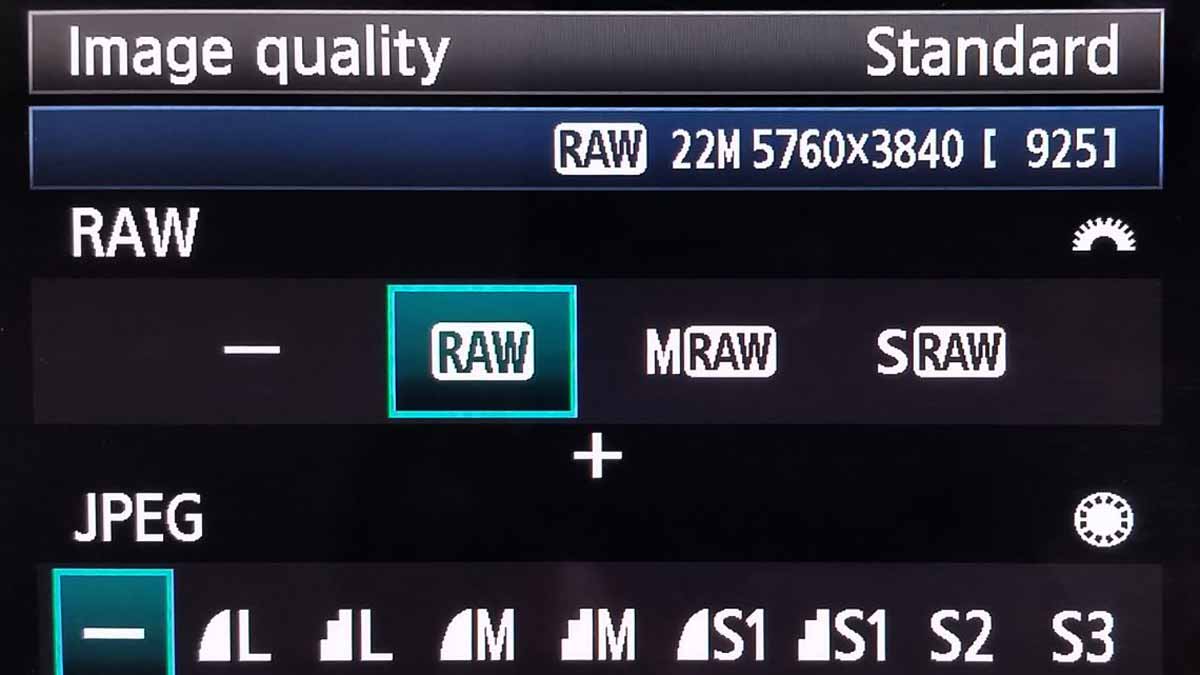
This Canon DSLR (a 5D Mark III) offers 3 RAW file resolutions (only the pixel count is different, the image quality is uncompressed), 2 levels of JPEG compression and 3 JPEG sizes (Large, Medium and Small). With JPEG quality the smooth curve indicates finer details and less compression. The jagged edges mean less fine detail, i.e. higher compression.
Just like with most other cameras these days, you can save two files and combine any kind of RAW with any kind of JPEG setting.